


List and detailed comparison of the best free Voice and Speech Recognition Software for Mac and Windows in 2026:
What is Voice recognition software?
Voice recognition software is an application that makes use of speech recognition algorithms to identify the spoken languages and act accordingly.
This software analyzes the sound and tries to convert it into text. These systems are available for Windows, Mac, Android, iOS, and Windows Phone devices.
Table of Contents:
Top-Trending Dictation Software

Voice recognition or dictation software can capture the word you say and type it on a computer. It can be helpful to the people who are physically disabled and for those who cannot work on the computer.
As per Gartner, 30% of interactions with the technology are performed through conversations.

As per the BBC, these systems should be able to recognize 95% of the sound correctly. While using this software one should talk clearly. Each and every person has a different voice, hence the speech recognition system should ask for enrollment of the voice before it gets used.
Using this software, one can write the whole document. But for accuracy, careful dictation is required. The software also supports editing of the document. For this, the software supports commands like ‘Select line’ or ‘Select paragraph’. After completion, the proofreading of the document is very important.
Factors that should be considered for selecting the software include accuracy, comprehension, ease of use, setup, supported languages, and price of the software.
List of the Best Voice Recognition Software
A list of the most popular Voice or Speech Dictation Software used by users worldwide with complete details is provided below.
Comparing the Top Speech Recognition Software
| Speech Recognition Software | Best For | Platform | Free Trial | Price |
|---|---|---|---|---|
Google Now | Android Mobile Devices. | Android & iOS devices. | – | Free |
Siri | iOS devices | iOS devices. | – | Free |
Cortana | Windows devices. | Windows 10, iOS, Android, and Windows phone devices | – | Free |
Amazon Lex | Creating Chatbot. | Used in the applications. | No | Based on the no. of speech requests processed. |
Dragon Professional | Overall dictation and voice recognition. | Windows OS | Yes | Dragon- Home is $150, Professional Individual is $300, Legal Individual is $500. |
Dragon Anywhere | Professional speech recognition for your mobile. | Android & iOS devices | Yes | $15 per month or $150 per year. |
Beey | Automated transcription | Web-based | 30 Minutes of transcription free | Charges 0.125 Euros per minute of audio recording |
Let’s Explore!!
#1) Google Now
Best for Android Mobile Devices.
Price: Free

Google Now is a feature of Google Search of the Google App. This feature is available for Android and iOS devices. Though it is available for iOS devices, it works best on Android devices.
Features
- It is well integrated with Android OS so that it can be used to perform any function.
- On Android devices, Google Now can be used for receiving calls, sending text messages, and for opening and closing the app.
- For iOS devices, it can be used for searching functionality.
Website: https://www.google.com/search/about/
#2) Google Cloud Speech API
Best for recognizing 120 languages.
Price: Speech recognition and video speech recognition is free for 0-60 minutes. From 60 minutes to 1 million minutes, speech recognition can be used at a rate of $0.006 per 15 seconds.
Similarly, video recognition can be used at the rate of $0.012 per 15 seconds. These prices are for the API to be used on the personal systems. If you want to use the API on embedded systems like cars and TVs then the prices will be different.

Google Cloud Speech API can be used for short-form and long-form video. It can be used for the processing of real-time streaming and pre-recorded audio. It automatically transcribes the correct nouns, dates, and phone numbers.
Features
- It can filter the inappropriate content.
- It is accurate in transcribing punctuation.
- It supports 120 languages.
- It automatically recognizes the spoken language.
Website: https://cloud.google.com/speech-to-text/
#3) Google Docs Voice Typing
Best for Dictation on Google Docs.
Price: Free

Suggested read => How To Strikethrough On Google Docs
Google Docs Voice Typing is integrated with Google Suite and hence it is the perfect tool if you want the dictation and voice recognition to be paired with Google Suite. It is indeed a very cost-effective solution.
Features:
- Supports 43 languages.
- The cursor can be moved around in the document by using the command “go to the end of the document”.
- It can understand the context of the speech.
Website: https://support.google.com/docs/answer/4492226?hl=en
#4) Siri
Best for iOS mobile devices.
Price: Free

Siri is the virtual assistant for Apple devices. 21 languages are supported by Siri. It will be pre-installed on Apple devices. It can respond in its own voice.
Further Reading => How to Change Siri Voice on iPhone or iPad
Features:
- It can connect a call to someone and can send text messages.
- It will help you to know ‘Who is calling you?’
- It can set alarms, timers, and reminders.
Website: https://www.apple.com/siri/
#5) Amazon Lex
Best for creating a Chatbot.

Amazon Lex is used in the applications to build a conversational interface. The developed bot can be used in the Chat platform, IoT devices, and mobile clients.
Features
- It can be integrated with AWS Lambda.
- Integration with AWS Lambda will give an application the power to trigger the functions and retrieve the data.
- It has the ability to multi-turn conversations.
- There are two types of prompts i.e. confirmation prompts and error handling prompts.
- With the help of Amazon Lex, you will be able to apply versioning to Intents, Slot Types, and Bots which are created by you.
- It provides 8 kHz telephony audio support.
Price: Pricing of Amazon Lex is shown in the below image.

Website: https://aws.amazon.com/lex/
#6) Microsoft Bing Speech API
Best for accuracy and ease of use.
Price: Pricing details are not provided by the company.
Further Reading => Most Popular Voice Monitoring Software Solutions

Microsoft speech recognition API is used to transcribe the speech into text. This transcribed text can be displayed by the application or the application can respond or act as per the command. It can also perform the text to speech conversion in many different languages.
Features:
- It supports 15 languages for dictation mode and 5 languages for conversion mode.
- It is useful for real-time continuous recognition.
- For interactive, conversion, and dictation scenarios, this API makes the best use of speech recognition results.
Website: https://docs.microsoft.com/en-us/azure/cognitive-services/speech/home
#7) Cortana
Best for Windows users.
Price: Free

Cortana is a virtual assistant which comes with Windows 10 systems and Windows phones. It is also available for Android and iOS devices.
Features:
Functions that Cortana can perform are mentioned below:
- Supported languages include English, French, German, Italian, Japanese, Chinese, and Spanish.
- Composing and sending a text message.
- Updating the calendar, reminders, and to-do lists.
- Music playing.
- Checking the weather.
Website: https://www.microsoft.com/en-in/windows/cortana
#8) Voice Finger
Best for customizable command capability.
Price: It can be downloaded for free. The full version is available at a price of $9.99.

Using Voice Finger, you can control the computer with voice only. There will be no need to use a keyboard and a mouse.
Features:
- You can control the mouse and keyboard.
- It supports Windows speech recognition commands.
- With this tool, you will be able to perform tasks with zero computer contact.
Website: https://voicefinger.cozendey.com/
#9) Philips SpeechLive
Best for Complete dictation, transcription, and speech recognition solutions.
Price: From $9.99 per user per month.
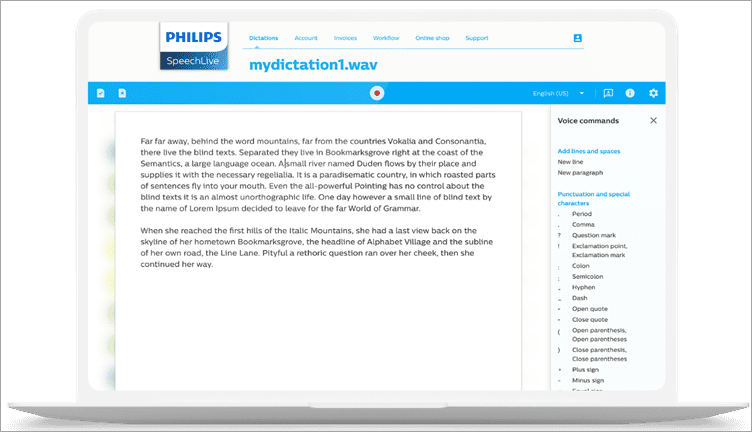
Philips SpeechLive is a browser-based dictation and transcription solution that converts your speech to text. It offers a speech-to-text add-on, as well as an optional human transcription service.
The solution is secure, GDP and CCPA-compliant, and therefore a good choice even for larger companies. It helps ease the communication between author and transcriptionist and allows authors to even create documents on their own using speech-to-text.
SpeechLive can be used with all microphones, but the best speech recognition results are achieved using dedicated Philips dictation microphones.
Features:
- Work from anywhere: office or remotely using a PC or smartphone.
- Works with all microphones or dictation recorders.
- Allow you to automate your voice-based document creation process.
- Optional Speech to text and human transcription service available.
- No complex installations are necessary.
#10) Rev
Best for Fast turnaround.
Price:
- Human Transcription: $1.50 per minute
- Automated Transcription: $0.25 per minute
- English Close Captions: $1.50 per minute
- Global Translated Subtitles: $5-$10 per minute

Rev offers manual and automated transcription services to casual users and businesses from multiple industries. It adheres to a pay-as-you-go model. So you pay by minute depending on the length of the video and audio you wish to transcribe.
Features:
- Transcribe videos or audio using AI
- Transcribe video and audio with the help of human professionals
- Annotate and share with Rev’s interactive editor.
- 90-99% accuracy of transcription.
#11) Vidnoz
Best for Accurate voice recognition in videos
Price: free to use
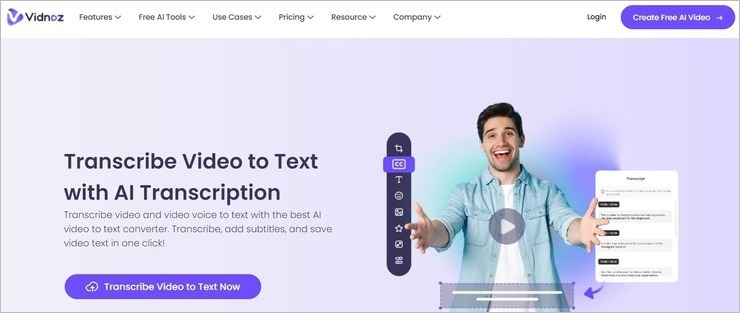
Vidnoz offers you a free-to-use video-to-text transcription tool that can accurately recognize the voice on a video. Vidnoz can be used to automatically generate subtitles for a video. It can recognize voices in multiple languages with an accuracy level that is as high as 98%.
Vidnoz will recognize the voices in a video, even if that video’s audio is of poor quality or has background noises obscuring the speech. You’ll also have the privilege of editing the transcripts generated by Vidnoz before you download the file.
Features:
- Transcribe videos with the help of an intelligent AI.
- Transcribe videos in multiple languages.
- Record videos directly from the software.
- Edit transcripts before downloading the final file.
#12) Dragon Professional
Best as an overall dictation and voice recognition software.
Price: Dragon Home is for $150, Dragon Professional Individual is for $300, and Dragon Legal Individual is for $500.

It is also called Dragon for PC. It can be used for personal as well as for official purposes.
Dragon Home can be used by anyone i.e. from students to daily multi-taskers. Dragon Professional Individual is useful for professional individuals and small businesses.
Features:
- Dragon Home will help you with several daily activities like dictating homework assignments, sending emails, and even web surfing.
- Dragon Professional Individual helps working individuals and small businesses in creating and transcribing documents, inserting a signature, or customize the vocabulary.
- It can be synchronized with Dragon Anywhere.
- Dragon Legal Individual is for helping legal professionals and small practices streamline the legal documentation.
#13) Dragon Anywhere
Best for iOS users.
Price: A free trial is available for 7 days. For one month, it will cost you $15. For three months, it will be $40 and for 12 months the cost will be $150.

Dragon Anywhere is the dictation software by Nuance for iOS devices. It is a cloud-based solution. It is for dictation and editing of documents of any length.
It provides you a cloud-based speech recognition tool. This means that you will be able to access the versions of the documents even from the mobile. This application will allow you to save your text to Evernote. Document formats like .docx, .rtf, .rrtfd, and text are also supported.
Features:
- Tasks like saving the document on a cloud, sending it by email, or importing the existing one, can be done through voice.
- It provides encryption to all your communications.
- No personal information is required for using the app.
- It will allow you to add custom words.
Website: https://dragon.nuance.com/
#14) Beey
Best for Automated transcription.
Price: Beey charges 0.125 Euros per minute of audio recording. You can contact team to get a custom quote for large volume of transcription work.

Beey facilitates AI-based voice recognition. It uses an accurate E2E model for high-quality speech-to-text conversion. As such, you can use the tool to automatically transcribe video and audio files within minutes. You can also translate the text in over 20 other languages.
Further Reading => Notta Review – Text to Speech Transcription Tool
You also have the privilege of proofreading and editing the text before downloading it. Beey can also create subtitles and captions for video files. Furthermore, Beey offers integration with your existing system via its API.
Features:
- AI-based voice recognition
- Supports voice translation in 20 languages
- Can create subtitles and captions for videos
- Helps you create fully searchable archives for audio and video resources
Website: https://www.beey.io/
Additional Tools to Consider
#15) Via Talk:
Via Talk is a VoIP phone service.
It will allow you to check voicemail via phone, web browser, and email. It will not let you miss a call as the call will get forwarded. It can record and save the conversation. It will cost you $7.87 per month for first two years. Later, You can upgrade it for $8.95.
Website: https://www.viatalk.com/
#16) Tazti:
Tazti is a voice recognition software that supports the Windows operating system.
It can be used to control applications, games, and robots. It will allow you to add your custom speech commands. You can buy the tool for $19.99.
Website: https://www.tazti.com/
#17) e-Speaking:
e-Speaking is a free speech recognition software for your computer. It provides 100 built-in commands. It has seamless integration with Office. It works with the Windows operating system.
Website: https://e-speaking.com/
#18) AV Voice Changer Software Diamond:
AV Voice Changer Software Diamond is the tool for changing the voice.
It supports all popular VoIP and Instant messaging applications like Skype and WhatsApp. It will allow you to capture audio streams from different applications. It can be used on any version of Windows operating system. You can download this application for free but the full version is available at $99.72.
Website: http://www.voicechangerdiamond.com/
#19) Braina:
Braina is an application for Windows operating system.
It is supported by Artificial Intelligence. It will work for any website or software. You can use it as a calculator. It can be used as a dictionary. It can open and search a file for you. One of the unique features of Braina is that it can remember notes for you.
Website: https://www.brainasoft.com/braina/
Conclusion
In this article, we have compared the top voice recognition software that is available in the market.
Also read =>> Most advanced AI Voice Generators
Each of them is best for different categories. Dragon Professional is best as an overall speech recognition software. Dragon Anywhere and Siri are best for iOS users. Cortana is best for Windows users.
Google Now is best for Android Mobile devices. For the dictation on Google Docs, Google Docs Voice Typing is the best option. For creating Chatbot, Amazon Lex is the best option.
Every tool has different pricing policies, where some charge for the product, some charge a monthly fee, and some charge based on the number of speech requests. Meanwhile, Google Now, Google Docs Voice Typing, Siri, and Cortana are available for free.
Suggested reading =>> Best Typing Software
Hope this informative article on Speech or Voice Recognition Software was useful to you!
Was this helpful?
Recommended Reading
-
![10 + Top Dictation Software [2020]](data:image/svg+xml,%3Csvg%20xmlns='http://www.w3.org/2000/svg'%20viewBox='0%200%20240%20135'%3E%3C/svg%3E)
This tutorial compares the top Dictation Software with features and pricing. Select the best voice to text software for your requirements: Dictation software allows you to speak instead of typing. The application has a text-to-speech recognition feature and converts spoken words to text. The technology has come a long way,…
-
Comparison of the Best Free Android and iOS Mobile App Development Software Tools and Platforms to create stunning high-quality Mobile Apps for Your Business: App development software is an application that helps with the app development process by providing functionalities like IDE, code-free development, templates, API, data synchronization, and Analytics.…
-
Get to know more about the Best Voice Monitoring Software Solutions along with their comparison to understand the different functionalities they offer: Voice Over IP (VoIP) technology delivers significant benefits compared to traditional telephone lines. From reduced costs, flexibility, and greater scalability to integrating calls with other internet-based business applications,…
-
This tutorial explores and compares the best Discord Voice Changer software with pricing. Select a professional or free voice changer for Discord from this list: Nothing can match the popularity of Discord Voice Changers today. The idea of being able to distort your voice to the point of it becoming…
![10 + Top Dictation Software [2020]](https://www.softwaretestinghelp.com/wp-content/qa/uploads/2020/09/10-Top-Dictation-Software-2020.png)


